Release Notes
Track new features, improvements, and fixes for the APSIS Document Analysis API.
v1.3.0
February 2026
- Drawing Classification - Automatic work package, drawing type, and summary extraction for drawings
API Changes (Action Required)
These changes may require updates to your integration:
New Fields on Drawing info
Four new nullable fields are now returned in the info object for drawings:
| Field | Type | Description |
|---|---|---|
work_package_code |
string or null |
Work package code (e.g., "2000") from a predefined list of construction categories |
work_package_description |
string or null |
Human-readable description (e.g., "Superstructure - Frame") |
drawing_type |
string or null |
One of: PLAN, ELEVATION, CONSTRUCTION DETAILS, SPECIFICATION |
summary |
string or null |
Brief AI-generated summary of the drawing contents |
These fields are only populated for documents classified as drawings (not specifications). They will be null if classification was skipped or failed.
How It Works
Classification runs automatically as part of the Extract Data pipeline (no additional API calls needed). For each drawing:
- Azure Document Intelligence extracts text via OCR
- LLM classifies the drawing against a predefined work package list and determines the drawing type
- Results are merged into the existing
inforesponse
Adds roughly 10 seconds to extraction time per drawing.
v1.2.0
January 2026
- Token Usage Tracking - Per-request token counts and cost reporting on all API operations
- Model Selection for Drawing Compare - Choose between OpenAI and Anthropic models
- Image-Based Specification Extraction - Extract Data now uses OCR image analysis for specifications, removed Docling approach to improve accuracy
- Increased PDF Page Limit - Extract Data/Doc Search now supports PDFs up to 2,000 pages (was 50) due to client request of having a requirement to use Doc Search on large documents
API Changes (Action Required)
These changes may require updates to your integration:
1. Specification Author Field Type Change
The author field in spec_info is now an array (matching the drawings info.author change from v1.1.0).
| Before (v1.1.0) | After (v1.2.0) |
|---|---|
"author": "Jane Doe" |
"author": ["Jane Doe"] |
2. New Request Parameters
| Endpoint | Parameter | Type | Default | Description |
|---|---|---|---|---|
POST /api/drawings/agent-comparisons |
model |
string | gpt-5.1 |
LLM model for change analysis |
Supported models include OpenAI (e.g. gpt-5.1, gpt-5.2) and Anthropic with litellm/anthropic/ prefix (e.g. litellm/anthropic/claude-3-5-sonnet-20241022).
New Features
Token Usage Tracking
Every API response now includes a token_usage field with a full breakdown of AI model usage and estimated cost. This is logged to the API and returned in responses for all features:
- Extract Data:
token_usageon the task object (GET /api/drawings/tasks/{id}) - PDF Diff:
token_usageon the diff object (GET /api/drawings/pdf-diffs/{id}) - Drawing Compare:
token_usageon the comparison object (GET /api/drawings/agent-comparisons/{id}) - Chunk & Embed:
token_usageon the embedding task (GET /api/drawings/embedding-tasks/{id}) - Document Search (RAG):
token_usagereturned inline in the response (POST /api/drawings/rag)
Token usage is tracked even on failed tasks — any tokens consumed before the failure are recorded.
Example token_usage field:
{
  "token_usage": {
    "models": {
      "gpt-4o": { "input_tokens": 25000, "output_tokens": 4000, "total_tokens": 29000 },
      "gpt-4o-mini": { "input_tokens": 1200, "output_tokens": 300, "total_tokens": 1500 },
      "text-embedding-3-small": { "input_tokens": 12000, "output_tokens": 0, "total_tokens": 12000 }
    },
    "total_cost_usd": 0.103465
  }
}
See Token Usage Tracking in the API docs for full details on viewing and collecting usage data.
Model Selection for Drawing Compare
You can now select which LLM model to use when creating a drawing comparison. This supports both OpenAI and Anthropic models via LiteLLM.
curl -X POST ".../api/drawings/agent-comparisons" \
  -d '{"prev_file_id": 123, "new_file_id": 125, "model": "gpt-5.2"}'
Image-Based Specification Extraction
Specifications are now extracted using OCR image analysis (matching the approach already used for drawings), replacing the previous Docling-based extraction. This results in more accurate author detection, document titles, and revision information from specification PDFs.
Improvements
Performance
- PDF page limit increased from 50 to 2,000 pages per document
- Chunk embedding processes in batches for better memory handling on large documents
Drawing Compare
- Faster processing with optimized image alignment
- Better accuracy with improved change detection and reduced false positives
- Support for both OpenAI and Anthropic models
Accuracy
- OCR image-based extraction for specifications replaces Docling, improving metadata quality
- Compare accuracy improvements with updated prompt engineering
v1.1.0
January 2026
- Multiple Authors - Now detects all company names on drawings, not just the first
- Confidence Indicators - Know when extractions are high or low confidence
- Faster Processing - Parallel batch processing with reduced timeouts
- LangSmith Tracing - Full visibility into every LLM call with cost dashboards
API Changes (Action Required)
These changes may require updates to your integration:
1. Author Field Type Change
The author field in drawing info is now an array to support multiple authors. (The spec_info.author field was also changed to an array in v1.2.0.)
| Before (v1.0.0) | After (v1.1.0) |
|---|---|
"author": "Smith & Associates" |
"author": ["Smith & Associates", "Jones Engineering"] |
2. New Fields Added
| Field | Type | Description |
|---|---|---|
extraction_method |
string |
yolo_crop (high confidence), heuristic_crop (low confidence), or null |
3. Date Format Standardised
Dates are now returned in DD-MM-YYYY format (UK standard).
| Before (v1.0.0) | After (v1.1.0) |
|---|---|
"2024-01-15" or "January 15, 2024" |
"15-01-2024" |
New Features
Multiple Authors Detection
The system now detects and returns all company names and authors found on a drawing, not just the first one. Useful for drawings involving multiple firms (e.g., architect + structural engineer).
Extraction Confidence Indicator
Each extracted drawing includes a confidence level:
| Confidence | Meaning |
|---|---|
High (yolo_crop) |
Object detection model found and cropped the title block area |
Low (heuristic_crop) |
Title block not detected; used fallback (bottom 50% of page) |
Low confidence extractions may be less accurate but still provide useful data in most cases. Standard formats with title blocks in the bottom right typically extract well.
Smarter Filename Recognition
The system uses PDF filenames as hints for author detection. Current mappings:
| Filename Pattern | Author |
|---|---|
271_* |
Convery Prenty Architects |
649* |
Designme |
22007_* or 21014_* |
Apsis |
7871_* |
Grossart Associates |
3077-CDP-* |
Clyde Design Partnership |
1477-ABC-* |
Anderson Bell + Christie |
We can add more mappings as needed - just let us know.
Automatic Search Indexing
Documents are automatically indexed for Document Search after extraction - no additional steps required.
Improvements
Performance
- Documents processed in parallel batches, significantly reducing wait times
- Timeout reduced from 2 minutes to 1 minute per document
- Results returned immediately while embedding (indexing) happens in background
Accuracy
- Upgraded to GPT-5.2 model for reading title block information
- Improved padding around title blocks to avoid cutting off edge fields
- Better classification to distinguish Drawings from Specifications
- Author names and drawing titles formatted in Title Case
- Dates standardised to DD-MM-YYYY format
Reliability
- Long text fields handled gracefully instead of causing errors
- Better recovery from temporary failures
Bug Fixes
- Fixed issue where very long drawing titles could cause extraction to fail
- Improved handling of unusual drawing formats
Cost & Transparency
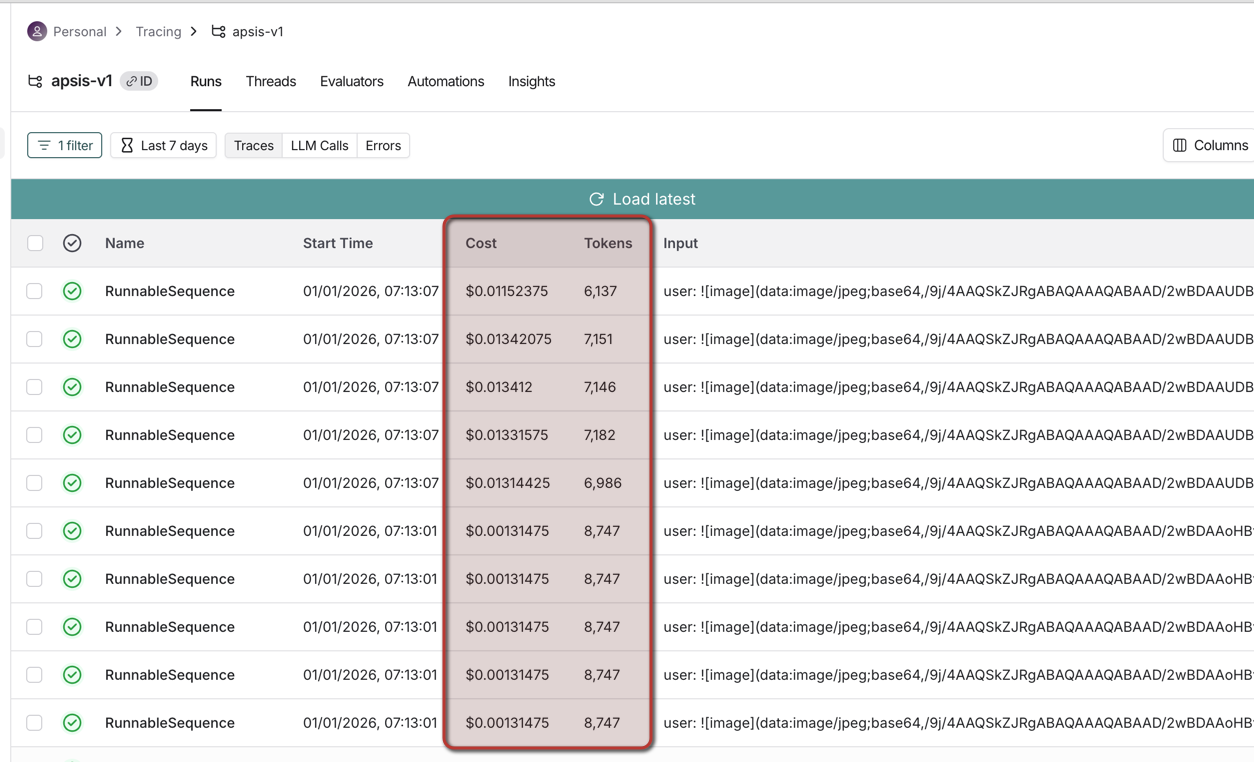
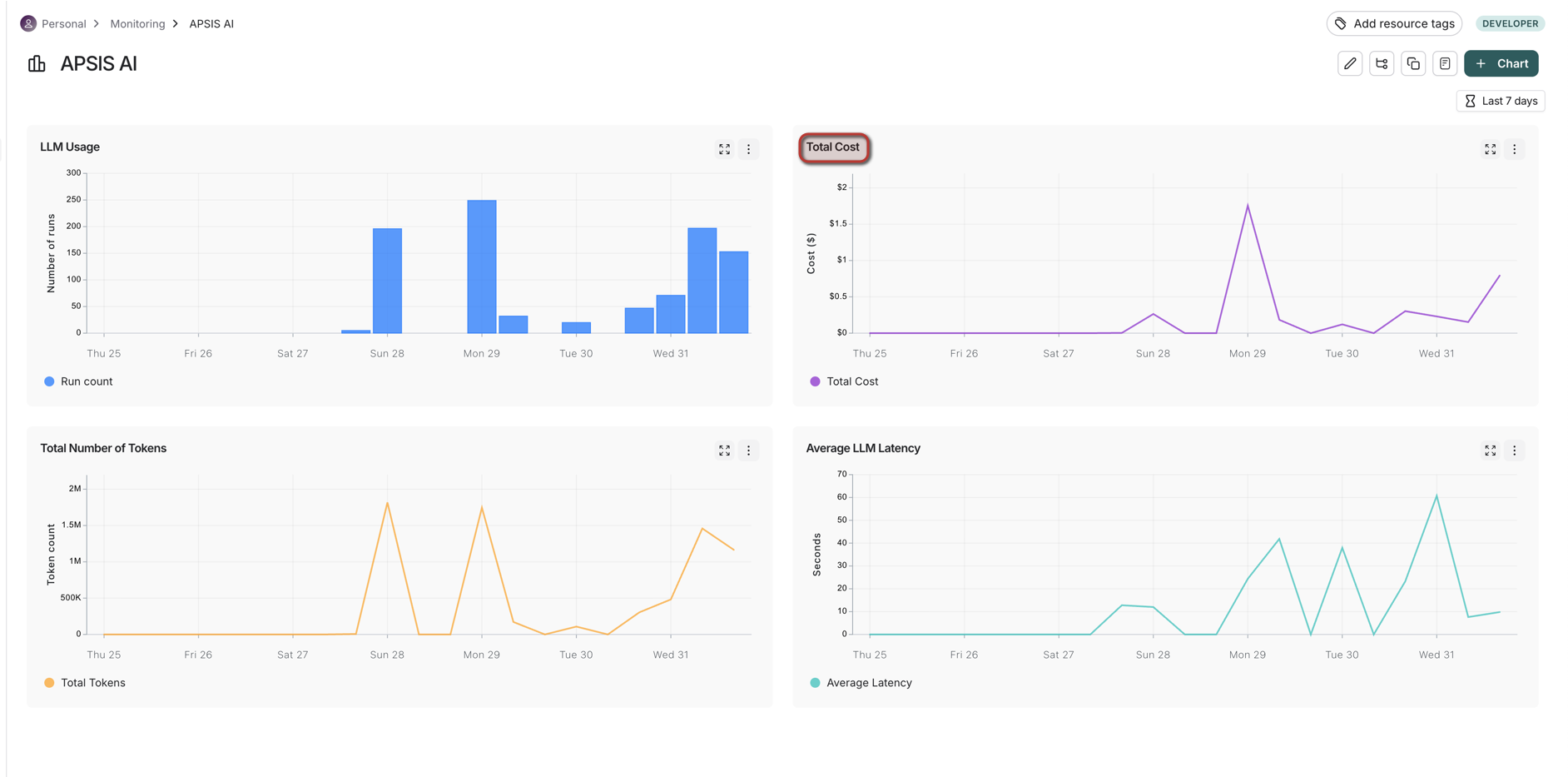
LangSmith Tracing
Every API call is also tracked via LangSmith, enabling:
- Full trace visibility for every LLM call
- Daily/weekly/monthly usage dashboards
- Cost analysis broken down by document or time period
Cost Example
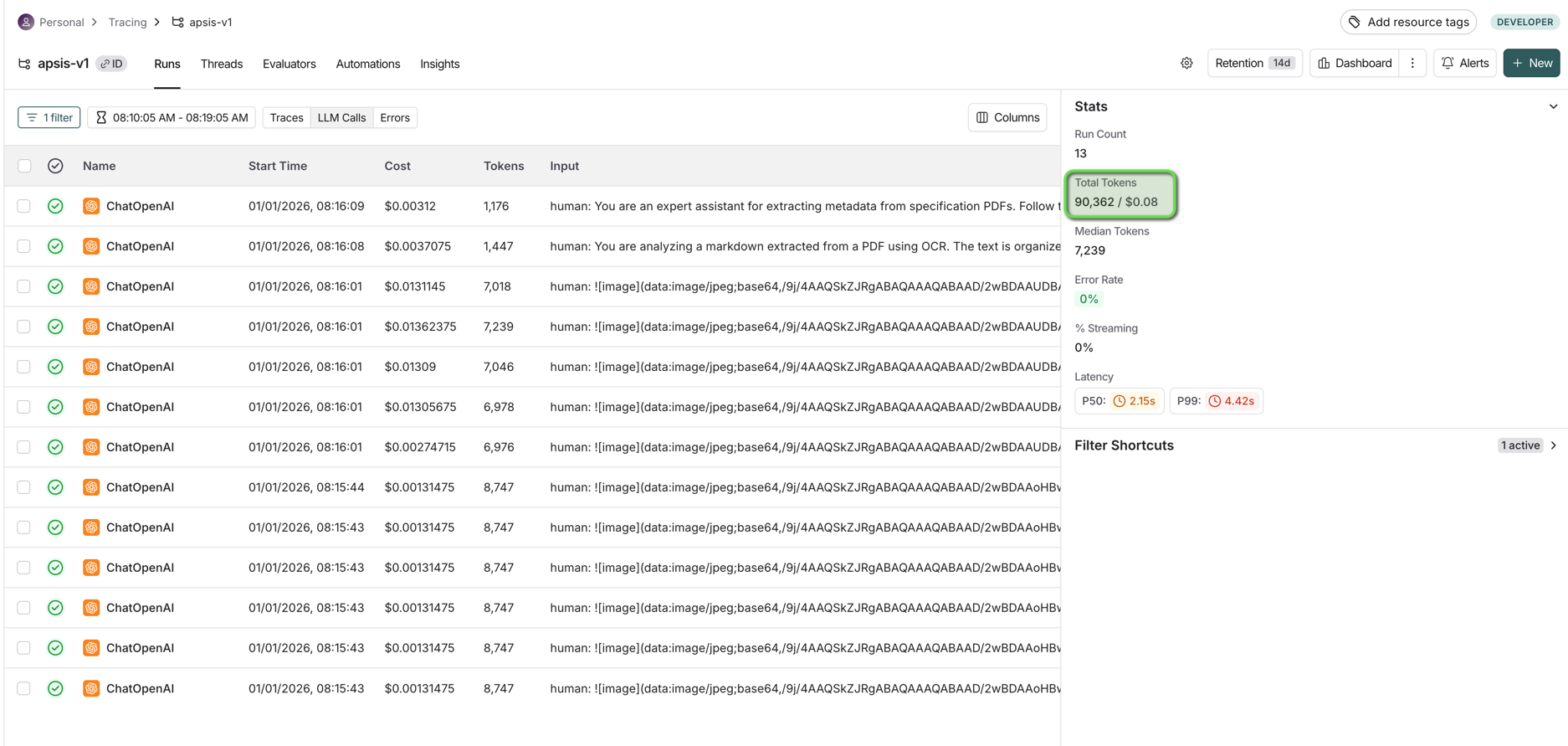
Processing 6 construction drawings:
| File |
|---|
| 0195 BW-SL-010—LANDSCAPE LAYOUT.pdf |
| 0195 BW-SL-011-A-FINISHES & BOUNDARY TREATMENT.pdf |
| 0195 BW-SL-012-A-PLOT WORKS PLOTS 1-7.pdf |
| 0195 BW-SL-013—PLOT WORKS PLOTS 8-17.pdf |
| 0195 BW-SL-014—PLOT WORKS PLOTS 18-34.pdf |
| 0195 Newburgh Issue Sheet-1.0-SB Architects -DET.pdf |
| Metric | Value |
|---|---|
| Files processed | 6 drawings |
| Total tokens | 30,862 |
| Total cost | $0.08 |
| Cost per drawing | ~$0.01 |
Cost Optimisations
- Classification images compressed, reducing API costs by ~95%
- Large drawings automatically resized before processing
Technical Notes
Fine-Tuning Research
We trained a custom APSIS model for title block extraction. While accurate, it was significantly slower than the standard model. After weighing trade-offs, we chose GPT-5.2 for its similar quality and faster processing times.
Current Infrastructure
Model Hosting: The system uses a Tier 4 GPT-5.2 model hosted on the Agency AI OpenAI account, providing high rate limits (2M tokens/min) with pay-as-you-go billing.
Future Options To Consider:
| Option | Pros | Cons |
|---|---|---|
| APSIS OpenAI Account | Direct billing to APSIS, same API | Requires $250 spend to reach Tier 4 rate limits |
| APSIS Azure OpenAI | UK data residency, Azure AD integration, enterprise SLA | Lower default rate limits (must request increases from Microsoft) |
Key Trade-offs:
- OpenAI Direct: Higher rate limits automatically, latest models first, but data processed in US
- Azure OpenAI: Better for UK/EU compliance and enterprise integration, but slower rate limit approvals
Rate Limiting: Currently no per-user limits are enforced. Options to consider include per-user token quotas, concurrent request limits, or hosting multiple model instances with round-robin distribution. Need to have a discussion with Alex/Paul on this asap.
v1.0.0
November 2024
- Initial release of the APSIS Document Analysis API
Features:
- Extract Data - Automatically extract metadata from drawings and specifications
- Detect Revision - Track document versions and predict next revision numbers
- Compare Specifications - Visual diff and AI analysis of specification changes
- Document Search - Semantic search using natural language
- Drawing Compare - Visual comparison of construction drawings